> For the complete documentation index, see [llms.txt](https://daisychain.gitbook.io/help/llms.txt). Markdown versions of documentation pages are available by appending `.md` to page URLs; this page is available as [Markdown](https://daisychain.gitbook.io/help/integrations/mobilize.md).
# Mobilize
Connect Daisychain and Mobilize to power your event outreach and engagement
#### Setup and Configuration
To setup the Mobilize integration, visit **Settings > Integrations > Mobilize**, and follow the on-screen instructions.
If you use the "unauthenticated" version, you'll be able to easily view nearby Mobilize event information on any Pathway that has the Mobilize "power-up," which makes it easy to invite people to events by sharing links with them.
#### **Importing RSVPs**
When you integrate your Daisychain and Mobilize account, past RSVPs will be automatically be imported into Daisychain, and new RSVPs will be imported on an ongoing basis. This will include basic information about RSVPs (name, contact info, etc.) as well as the events they attended and any opt-in info stored by Mobilize.
#### **Additional Features**
If you use on the "authenticated" version of the Mobilize integration, you'll be able to do the following with Mobilize RSVPs:
* View their event attendance information in their Daisychain timelines.
* Trigger an [Automation](/help/organizing/automations.md) when people RSVP to a Mobilize event, which makes it easy to organize and engage attendees.
* [Filter](/help/managing-data/filtering-people.md) the People list by event attendance, making it easy to target and engage with people who have attended (or will attend) specific events.
* Use automations to send supporters invitations to nearby Mobilize events.
* Use an [Automation Step](/help/organizing/automations.md) to RSVP someone to a specific Mobilize event. (See the info-box at the bottom of this page for more detail.)
#### **Mobilize Message Campaigns**
If your account is integrated with Mobilize, you can choose "Recruit Mobilize Attendees" as a goal when sending out a texting campaign. You'll see two options here:
1. **Invite audience to a specific event via URL.**\
This will pre-populate your outgoing message with a `{{ mobilize_event_url }}` variable. Sending a message campaign with this variable which will ensure that recipients receive a unique link that enables:\
\
\- Click and RSVP tracking, providing real-time analytics on a per-recipient basis.\
\
\- Pre-filling of the Mobilize form, saving attendees from manually entering basic contact data that you have about recipients in Daisychain: name, email, phone number, address, etc
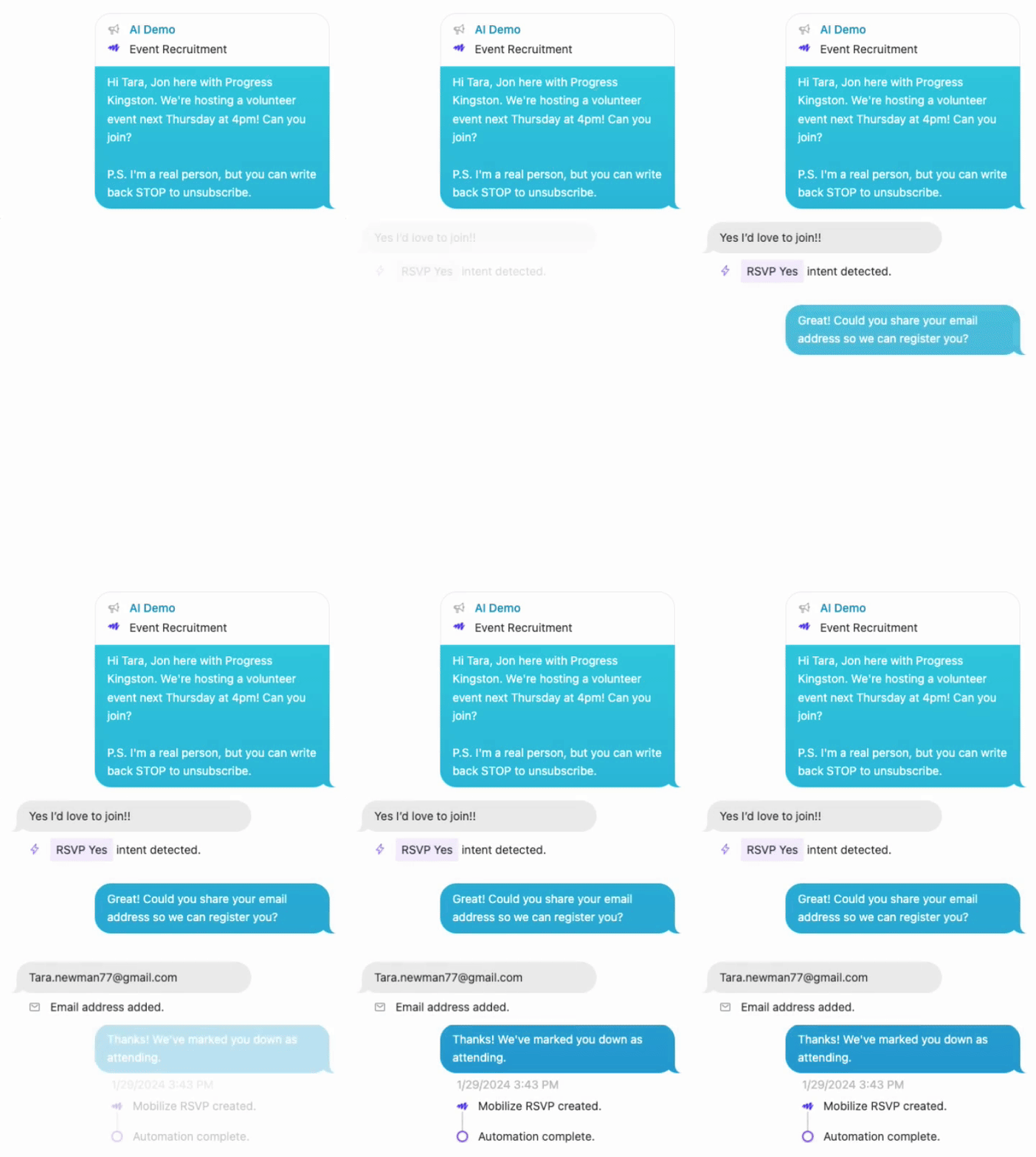
2. **Invite audience to a specific event time-slot via conversation. (Al Assist)**\
This is an experimental feature in Daisychain that enables you invite *and* RSVP people to a Mobilize event without directing them to fill out a form on the Mobilize page.\
\
This option will:\
\
\- Use AI to detect the intent of the recipient's response and suggest the right customizable templated reply.\
\
\- Automatically requests and records email and/or ZIP as-needed.\
\
\- Record the RSVP in Mobilize, eliminating the need for the texter or the recipient to fill out the form.\
\
Here's a preview of what this look like in-action:
{% hint style="warning" %}
**Using Daisychain to create RSVPs in Mobilize**
To activate features of Daisychain's Mobilize integration that will enable you to *create* RSVPs in Mobilize, you'll need to reach out to the Mobilize support team at to ensure this is supported on your account. Here's an example email:
> Hi there,
>
> I'd like my organization to have access to the "organization event attendance" API end-point so we can use the Mobilize/Daisychain integration to RSVP people to Mobilize events.
>
> Please let me know if you need any other info from me.
>
> Thanks!
> {% endhint %}